Important: This article provides general marketing and website-planning information. It is not legal advice. Laws, regulations and platform policies vary by industry, activity and jurisdiction. Organizations should obtain advice from qualified legal and compliance professionals for their specific circumstances.
Every business website has rules to follow. Regulated industries add more layers to the work.
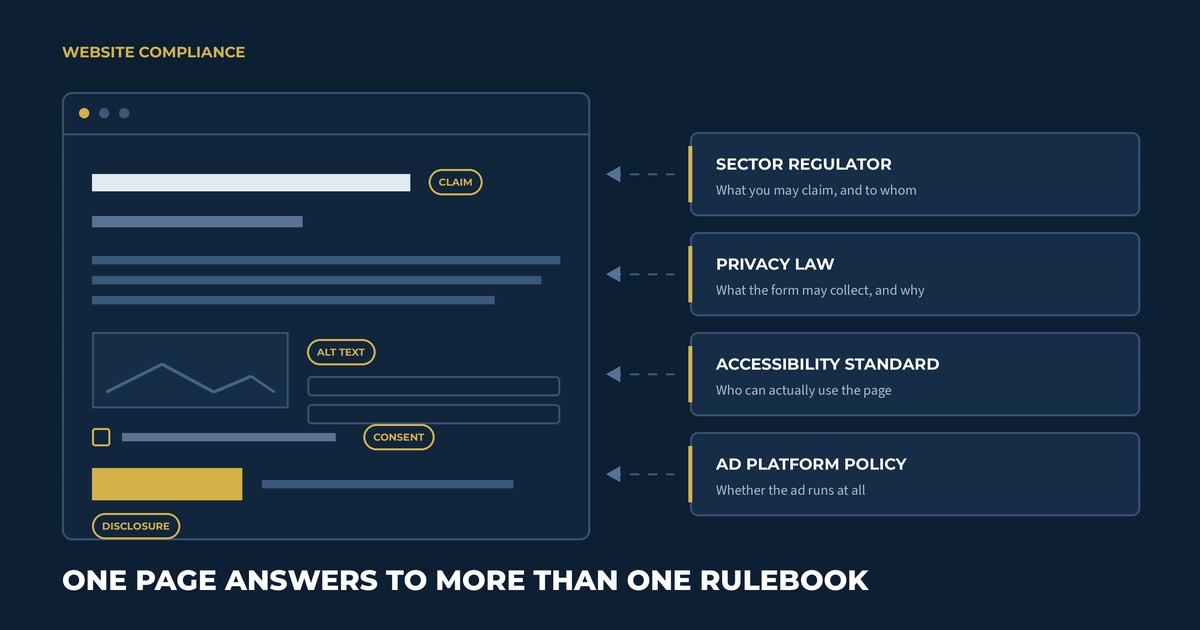
A single page may need to satisfy sector-specific promotion rules, Canadian privacy requirements, accessibility standards and the policies of whichever advertising platform sends traffic to it. The wording of a headline can matter. So can the information collected by a form, the audience allowed to view a promotion and the evidence supporting a product claim.
This complexity can slow marketing teams down when responsibilities are unclear. A thoughtful compliance process gives the team a shared way to plan, review and maintain the website. It also helps designers and developers build requirements into the structure before content reaches the final approval stage.
What website compliance includes
Website compliance is the practice of aligning a site with the requirements that apply to the organization and its digital activity.
Those requirements may come from several places:
- Federal, provincial or territorial law
- An industry regulator or professional college
- Privacy and accessibility standards
- Advertising and email rules
- Contracts, licensing agreements or funding conditions
- Internal brand, risk and legal policies
- Search engines, social networks and advertising platforms
The applicable mix depends on what the company sells, where it operates and who uses the site. A cannabis equipment manufacturer will have a different requirements profile than a financial advisor, healthcare provider or registered charity.
Start each project by identifying the rules before deciding how the website will communicate the offer. This gives web development and hosting, copy, design and compliance teams the same foundation.
Build a requirements register before writing copy
A requirements register is a working record of the obligations and policies that may affect the website.
For each requirement, document:
- The official source or policy
- Which pages, audiences or actions it affects
- The internal owner responsible for interpretation
- Evidence or records the organization must retain
- The review frequency
- The date of the most recent confirmation
Separate legal interpretation from marketing implementation. Counsel or a qualified compliance lead can explain what the organization must achieve. The marketing and web teams can then develop an effective way to meet that requirement within the customer experience.
Make the register specific enough to guide a decision. One useful entry could read: “Quote-request forms collect business contact information for follow-up; the privacy notice must explain the purpose and any third-party sharing.”
Include platform policies when they affect distribution. An advertisement can be restricted even when the destination page is permitted under the law. Search, social and advertising services each maintain their own eligibility rules, and those policies can change independently of legislation.
Create risk levels for the website
Some parts of a regulated website carry more risk than others. Classify pages and features according to the type of review they need.
A simple risk model might classify content as:
- Standard: Contact details, leadership biographies and general company information using approved language
- Elevated: Product descriptions, testimonials, pricing, comparisons and downloadable resources
- High: Health or performance claims, age-restricted promotions, financial projections, sensitive-data forms and content requiring a regulated disclosure
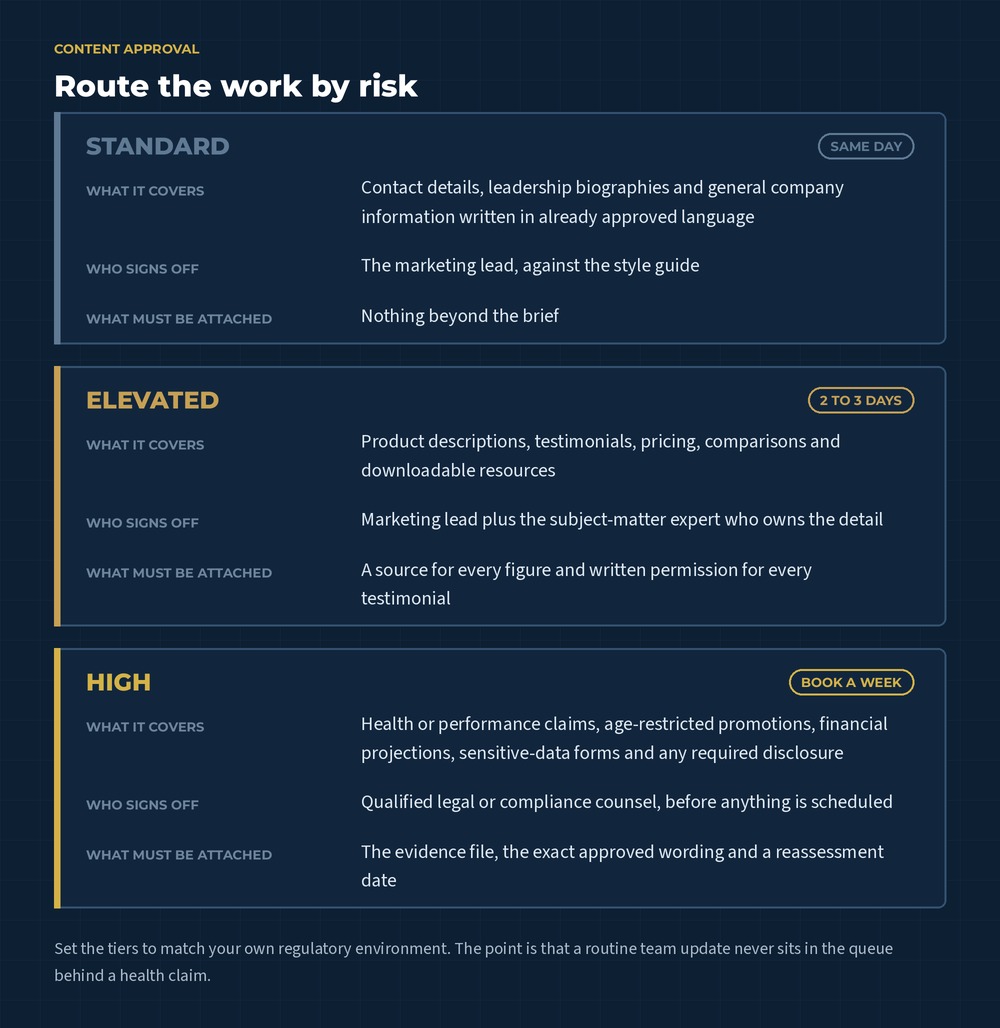
The categories should reflect the organization’s actual environment. Their purpose is to route work efficiently. A low-risk team update may follow a light approval path, while a new product claim needs supporting evidence and specialist review.
Page templates can carry part of this logic. Required disclosures, consent text and approved calls to action can be built into the content management system. Editors still need guidance because context can change the meaning of otherwise approved language.
Review the overall impression of every claim
Website claims include more than direct promises. Images, headings, testimonials, charts and page layout can shape what a visitor understands.
The Competition Bureau explains that the Competition Act prohibits materially false or misleading representations and applies a general impression test that considers the entire advertisement, including its words, graphic elements and overall layout, alongside its literal meaning.
Create a claim record for statements that describe performance, outcomes, superiority, savings or measurable benefits. The record can include:
- Exact approved wording
- The evidence supporting it
- Conditions or limitations
- Approval date and reviewer
- Pages and campaigns where the claim appears
- Expiry or reassessment date
Write qualifications close to the related claim and make them easy to notice. A disclosure hidden in a distant terms page may do little to correct an impression created by a prominent headline.
Avoid stretching a customer testimonial beyond the person’s actual experience. Keep permission records and confirm that edits preserve the meaning of the original statement. If compensation or another material connection exists, obtain guidance on the disclosure needed.
Environmental language needs the same discipline. The Competition Bureau’s greenwashing guidance for businesses emphasizes truthful, specific claims with adequate testing or substantiation where required.
Understand industry-specific promotion rules
Sector rules can influence who may access promotional content and how products are described.
Health Canada’s guidance on the promotion of cannabis explains broad prohibitions and limited permitted forms of informational or brand-preference promotion. It also addresses youth appeal, testimonials, endorsements and health or cosmetic claims. Organizations connected to the cannabis sector should obtain advice on how the Cannabis Act and regulations apply to their products, services and role in the supply chain.
Other industries may face rules concerning professional titles, required disclosures, audience eligibility, comparative claims or how testimonials can be used. Build those restrictions into the brief for brand messaging and copywriting. Writers need access to approved terminology and enough subject-matter context to explain the offer clearly.
When an age gate, jurisdiction selector or eligibility check is required, define what the control must accomplish. Decide which content it protects, how users are verified, whether the selection is remembered and what happens when someone is ineligible. Test direct links to internal pages so the control works beyond the homepage.
Collect personal information with a defined purpose
Contact forms, quote requests, account registrations, analytics tools and chat systems may collect personal information.
The Office of the Privacy Commissioner of Canada explains that meaningful consent under PIPEDA requires people to understand the nature, purpose and consequences of the collection, use or disclosure of their information. Because the applicable law depends on the organization’s activities and jurisdiction, confirm the requirements that apply.
For every form, document:
- The business purpose for each field
- Whether the field is required or optional
- Where the information is stored
- Which employees and service providers can access it
- How long it is retained
- How a person can ask questions or exercise applicable rights
Collect the information needed for the stated purpose. Industrial-equipment quote forms may reasonably ask about facility requirements, while newsletter forms often need far less.
Place privacy information where it can help a person decide. Link to the full privacy policy and add concise, contextual language beside sensitive or unexpected requests. Review third-party embeds, analytics products and form integrations because data can move beyond the website’s immediate interface.
Separate inquiry consent from marketing consent
A person who requests a quote expects a response to that request. Ongoing promotional email introduces a separate decision.
The CRTC’s CASL guidance summarizes three core requirements for commercial electronic messages: consent, identification information and an unsubscribe mechanism, subject to the Act’s exceptions and specific circumstances.
Design forms so the user’s choice is clear. Avoid preselected marketing boxes. Store the consent language, source, date and time alongside the contact record. If the offer includes several types of communication, explain what the subscriber will receive.
Marketing automation can preserve this information and route contacts according to their permissions. Build suppression and unsubscribe handling into the system so preferences remain consistent across campaigns and connected tools.
Include accessibility in the compliance plan
Accessible design helps people with visual, auditory, motor and cognitive disabilities use the website. It also improves many everyday interactions, including navigating by keyboard, reading captions in a quiet space and completing forms on a small screen.
In Ontario, the AODA website requirements apply to designated public-sector organizations and businesses or non-profits with 50 or more employees. The province’s current guidance says covered public websites and applicable content published after January 1, 2012 must meet WCAG 2.0 Level AA, with specified exceptions for live captions and prerecorded audio descriptions. Review the official Ontario website accessibility guidance and the current regulation when assessing legal duties.
Smaller organizations can still use accessible practices to serve more people and prepare for growth. Common areas to test include:
- Keyboard navigation and visible focus states
- Text alternatives for meaningful images
- Colour contrast and readable type
- Labels, instructions and error messages for forms
- Captions and transcripts for multimedia
- Heading structure and descriptive links
- Zoom, reflow and mobile interaction
- Accessible PDFs and downloadable documents
Automated tools can identify certain issues. Manual review and testing with assistive technology reveal barriers that scanners may miss. Ontario’s guidance recommends a combination of automated assessment, assistive-technology testing and feedback from people with disabilities when possible.
The W3C now recommends WCAG 2.2 as the latest version of the international standard. It is designed to be backward compatible with earlier WCAG 2 versions. An organization can use the newer guidance as a forward-looking design standard while confirming which version its governing law or policy references.
Build SEO around approved, useful language
Regulated businesses still need search visibility. Effective SEO and content systems can work within approved language and help qualified visitors reach accurate information.
Begin keyword research with the terms customers use, then map them against the claims and terminology the organization can support. Search demand never creates permission to publish a restricted phrase. Compliance review should flag keywords that imply an unapproved benefit or alter the overall impression of a page.
Create useful content around the questions the business can answer responsibly. Product specifications, process explanations, maintenance guidance and buying criteria may offer strong search value. Clear author and reviewer information can help readers understand where the expertise comes from.
Maintain one approved source for recurring descriptions and disclosures. Update related pages when guidance, evidence or product information changes. This prevents old wording from lingering in blog posts, PDFs and campaign landing pages.
Internal links should help visitors move from education to the appropriate product, service or contact page. For a catalogue-based business, our guide to building a product catalogue website as a sales tool explains how product data and conversion paths can work together.
Check the full advertising path
Compliance review should follow the customer’s entire path from advertisement to follow-up.
The ad, landing page, form, confirmation message and automated email may each be reviewed under different requirements. Keep the promise consistent across them. If a paid campaign uses an approved offer, the landing page should present the same eligibility, pricing and limitations.
Advertising platforms can restrict industries, products and targeting methods beyond the requirements of the law. Confirm current platform policies during campaign planning and again before launch. Build enough lead time for certification, identity verification or manual review where applicable.
Uncommon’s paid ads service can connect campaign strategy to an appropriate landing experience. Legal and compliance approval remains with the organization and its qualified advisors.
Create a content approval workflow that moves
Regulated marketing slows down when content arrives for review without context. A structured request makes decisions easier.
Send reviewers a package that includes:
- The intended audience and jurisdiction
- The page goal and traffic source
- New or changed claims highlighted clearly
- Supporting evidence and source links
- Required disclosures
- The proposed publication and review dates
Assign decision rights in advance. Specify who can approve brand language, interpret legal requirements, verify technical specifications and publish changes. Include a clear escalation route when reviewers disagree or the rule is uncertain.
Use version control so the published page matches the approved draft. Record material changes and keep evidence attached to the related claim or campaign. Restrict permissions for high-risk templates while allowing trained staff to manage routine updates.
Service-level expectations can keep review from becoming an open-ended queue. Set realistic turnaround times for each risk category and account for those windows in the campaign schedule. This is one of the places where marketing strategy and management earns its keep, because someone has to own the calendar that the review windows sit inside.
Maintain compliance after launch
Websites change through new pages, plugin updates, campaign experiments and staff turnover. Ongoing maintenance protects the work completed during the original build.
Set a review schedule based on risk. High-impact claims and regulated product pages may need more frequent checks than a general company history. Subscribe to updates from relevant regulators and platforms. Revisit the requirements register when the organization enters a new jurisdiction, changes its offer or adds a data-collection tool.
Monitor the live website for:
- Expired claims or outdated evidence
- Broken consent and unsubscribe flows
- Accessibility regressions
- Missing disclosures
- Unapproved changes to protected copy
- Forms sending data to the wrong system
- Old campaign pages that remain indexable
Create a response process for errors. Identify who can remove or correct content quickly, who assesses affected records or campaigns and how the organization documents the resolution.
What this looked like for Harvest Supply Canada
Harvest Supply Canada is a Port Colborne manufacturer and custom fabricator serving the cannabis industry. The company produces stainless-steel drying racks, trays and conveyor systems for commercial operations.
Its website needs to explain specialized products and engineering capabilities within a highly regulated market. The content also supports a B2B sales process where buyers may need technical details and a conversation before choosing a solution.
The build treated the regulatory requirements as part of the design brief rather than a final approval step. Every visual and content element was reviewed against cannabis marketing rules, age verification was implemented as part of the structure rather than bolted on afterwards, and the restrained palette and technical layouts were chosen to communicate precision to professional buyers instead of promoting a product. The site was also built so the team could keep content and disclosures current as the business and the regulations change, which is the part that decides whether a compliant launch stays compliant.
Explore the Harvest Supply Canada case study for the full project overview.
Website compliance checklist for regulated businesses
Use this checklist when planning a website or campaign:
- Identify the laws, regulations and policies that apply.
- Confirm the jurisdictions and audiences the website serves.
- Assign a qualified owner to interpret each requirement.
- Classify pages and features by risk.
- Record approved claims and the evidence behind them.
- Build required disclosures and controls into templates.
- Define the purpose of every form field.
- Review data storage, access and retention.
- Capture marketing consent separately where appropriate.
- Test accessibility with automated and manual methods.
- Map approved search terms to useful content.
- Review the path from ad through automated follow-up.
- Document approval roles and turnaround times.
- Keep a version history for high-risk content.
- Schedule recurring audits and regulatory reviews.
- Maintain a process for correcting live issues quickly.
The checklist should evolve with the organization. Every new product, audience or platform can introduce additional requirements.
Build compliance into the website from the beginning
A regulated-industry website can be clear, useful and persuasive while respecting the rules that shape the business. Success depends on early planning and a review process the team can sustain.
Uncommon brings web development, messaging, SEO and automation together around the customer journey. Contact the Uncommon team to discuss a website that supports your marketing and your compliance process.


